
DentistryOnline courseDigital Dentistry
Learn Meshmixer for dentistry the practical way — from install to trimming scans and Essix retainers
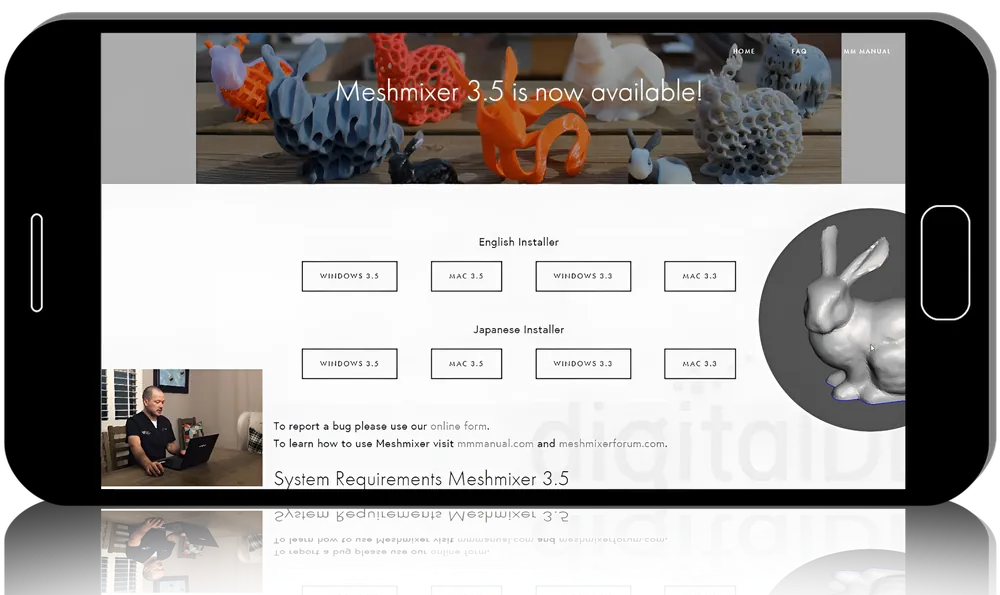
Meshmixer is free and powerful, but it fights back until someone shows you its tools. In the Meshmixer Basics Course, prosthodontist Nate Farley spends more than thirteen hours doing exactly that, across three parts: a beginner’s setup, an exhaustive tour of the tools, and their real dental uses. You finish able to prepare, base and edit intraoral scans with confidence.
- 3modules
- 40lessons
- 13 h 16 minof video
What you’ll be able to do
- Install Meshmixer, add teeth libraries and set up a workspace
- Command core tools — select, sculpt, plane cut, Boolean operations
- Recover from the errors and crashes that stall most beginners
- Align, clean and base intraoral scans for models
- Build Essix retainers, ortho bases and surgical guide edits
Inside the course
A grounded start
The introduction assumes nothing: installation, setup, teeth libraries and a walkthrough of the interface, so a complete newcomer gets moving without frustration.
The tools, one by one
The longest part methodically covers deform, remesh, extrude, tube handles, sculpting, Booleans and the full analysis suite — including why each tool commonly fails and how to push past it.
Turning tools into dental tasks
The final part applies that skill to real work: aligning and trimming scans, hollowing and basing models, digital extractions, tooth set-ups, articulator pins, Essix retainers and simple surgical guide editing.
About Nate Farley
A board-certified prosthodontist trained at Ohio State, he co-founded Infodontics to share free digital-dentistry resources and wrote his thesis comparing CAD/CAM and traditional surgical guides.
Built for
- Digital dentistry newcomersA guided on-ramp to a capable free modelling tool.
- Lab techniciansReliable methods for basing, trimming and set-ups.
- Frustrated Meshmixer usersA fix for the errors and crashes that block progress.
Curriculum
1. Introduction (56 min) 5 lessons
- Introduction
- Installation, setup and teeth
- Meshmixer walk-through
- Very basic tools
- Triangles!
2. Tools (7 h 33 min) 22 lessons
- Meshmix
- Select — deform and modify
- Select-edit — erase and fill, discard, reduce, remesh
- Select-edit — extrude, extract, offset
- Select-edit — tube handle, bridge, join, weld, separate
- Select-edit — plane cut, flip normals, fit primitives
- Select-edit — align to target, attract to target, attract brush
- Sculpt — brushes
- Sculpt — example
- Stamp
- Edit — mirror, duplicate, transform
- Edit — align, create pivot, plane cut
- Edit — close cracks, generate face groups, make solid
- Edit — hollow, make pattern, separate shells
- Edit — add tube, unwrap, generate complex
- Edit — multiple meshes, special menu
- Edit — multiple meshes, Boolean operations
- Analysis — inspector, units/dimensions, measure
- Analysis — mesh query, thickness, strength, stability
- Analysis — orientation, layout/packing, overhangs, slicing
- Analysis — multiple meshes, deviation, clearance
- Shaders
3. Dental (4 h 46 min) 13 lessons
- Introduction to dental applications
- Aligning scans to the plane
- Cleaning and trimming scans
- Adding a base to the scans
- Hollowing an ortho base
- Adding an ortho base
- Digitally extracting teeth
- Tooth set-up — basics
- Tooth set-up — anterior rehab
- Tooth set-up — full rehab
- Adding articulating pins
- Essix retainers
- Editing a simple surgical guide
Before you buy
Do I need to buy software?
Meshmixer itself is free. The course walks through installing it and adding the teeth libraries you will use.
Is this for complex cases?
It focuses on foundations and common dental tasks. Farley notes a follow-up course covers more advanced applications.
Do I get CME credit or a certificate?
No. Clinicapedia provides the educational content only — no CME or CE credits, MOC points or certificates of completion are included with this product.
Specifications
| Format | Online video course |
|---|---|
| Instructor | Nate Farley |
| Contents | 3 modules · 40 lessons |
| Duration | 13 h 16 min |
| Access | Lifetime, self-paced |
| Department | Dentistry |
| Delivery | Instant download · lifetime re-download |
Related products



Dentistry

Addiction Medicine