
DentistryOnline courseDigital Dentistry
Designing full-arch implant hybrids in Exocad — metal-free frameworks from try-in to pink composite
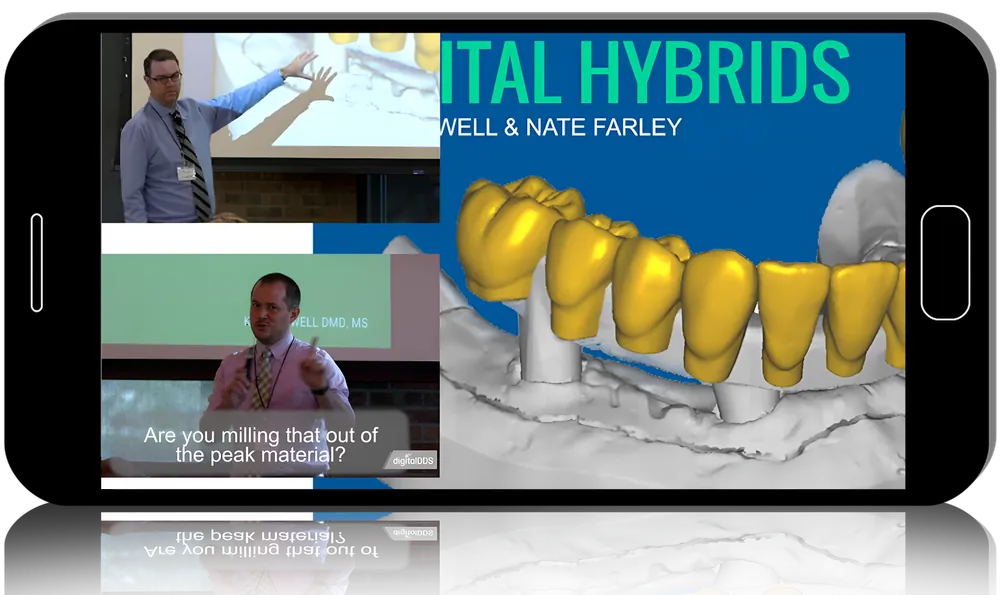
Prosthodontists Nate Farley and Kent Howell show how to plan and design full-arch prostheses on implants without being tied to one material in Digital Hybrids for Dentists & Technicians. Four modules and 27 lessons (about 14 h 45 min) cover records, printed try-ins, thimble and wrapped-bar frameworks, individual crowns and finishing with pink composite, with live Exocad design sessions throughout.
- 4modules
- 27lessons
- 14 h 45 minof video
What you’ll be able to do
- Plan an AOX full-arch case: implant number, appointments and occlusal scheme
- Start a digital workflow from an edentulous arch or an existing interim
- Design and print a wear-home try-in in Exocad
- Design and mill thimble or wrapped-bar frameworks in materials such as Pekkton, Trinia or titanium
- Cement individual crowns and characterise with pink composite
Inside the course
Why move beyond metal-acrylic
The opening module reviews hybrid history since Brånemark, design considerations and two lessons on materials, arguing that denture teeth on metal frames chip and wear quickly and comparing non-metal framework options.
Records to try-in
Scanning, designing the try-in and printing it are demonstrated, including two live design sessions of the try-in in Exocad.
The definitive prosthesis
Nine lessons cover thimble and wrapped frameworks, milling and finishing, designing and milling single crowns, and designing teeth on a wrapped bar.
Finishing and delivery
Final try-in, crown cementation, pink composite layering in two parts and insertion close the workflow.
Built for
- Dental technicians using ExocadHands-on design of hybrid frameworks and crowns.
- Prosthodontists and implant restorative dentistsClinical steps and planning for immediate load and conversion prostheses.
Curriculum
Some Basics (3 h 34 min) 5 lessons
- Intro
- Design considerations
- Materials part 1
- Materials part 2
- Case presentations
Digital Hybrids: Records to Try-in (5 h 8 min) 7 lessons
- Starting with edentulous arch
- Starting with interim hybrid
- Scanning
- Designing the try-in
- Live: try-in design part 1
- Live: try-in design part 2
- Printing the try-in
Digital Hybrids: Designing the Final (4 h 4 min) 9 lessons
- Thimble framework
- Wrapped bar framework
- Live: wrapped bar design
- Milling the framework
- Removing and finishing the framework
- Designing individual crowns
- Milling the crowns
- Designing wrapped bar teeth
- Live: wrapped teeth design
Finishing the Hybrid (1 h 58 min) 6 lessons
- Final try-in
- Cementing crowns
- Pink composite
- Final insert
- Adding pink composite part 1
- Adding pink composite part 2
Before you buy
Is this the instructors’ newest workflow?
No. It is their original version, recorded before they adopted photogrammetry and built around thimble frames finished with Anaxgum.
Do I need Exocad and special hardware to follow along?
For hands-on design, a Windows laptop with at least 16 GB RAM, a GTX 1070-class graphics card and a mouse is recommended. Demo Exocad software is mentioned in the original outline, but a licence should not be assumed to come with the recording.
Do I get CME credit or a certificate?
No. Clinicapedia provides the educational content only — no CME or CE credits, MOC points or certificates of completion are included with this product.
Specifications
| Format | Online video course |
|---|---|
| Instructors | Nate Farley, Kent Howell |
| Contents | 4 modules · 27 lessons |
| Duration | 14 h 45 min |
| Software | Exocad |
| Access | Lifetime, self-paced |
| Department | Dentistry |
| Delivery | Instant download · lifetime re-download |
Related products




Dentistry


Anesthesiology