

DentistryOnline courseSurgery
Full-arch guided surgery in Blue Sky Plan and Meshmixer — bone reduction, pin and hybrid guides
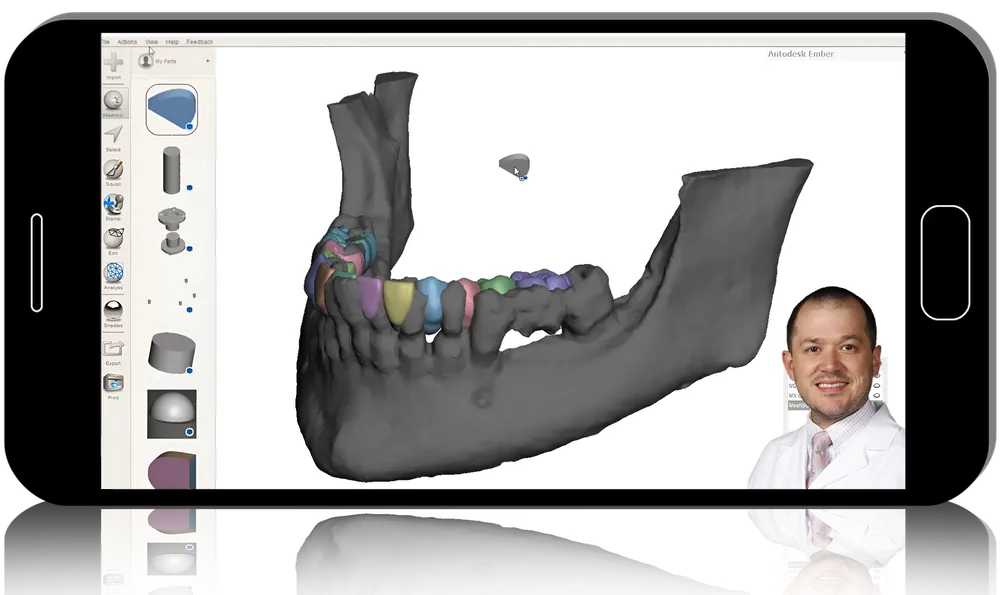
Single implants are simple in free planning software; full arches are not. In Advanced Implant Planning, prosthodontist Nate Farley extends Blue Sky Plan with the free 3D editor Meshmixer to plan full-arch implant cases. Twenty-nine lessons (4 h 41 min), mostly in slide-then-video pairs, take you from STL import and bone segmentation to a virtual tooth set-up, bone reduction, a sectioned surgical guide, a hybrid base and a pin guide.
- 29lessons
- 4 h 41 minof video
- 2software programs
What you’ll be able to do
- Load the right diagnostic STL and CBCT data into Blue Sky Plan
- Segment bone and wax a full-arch tooth set-up virtually in Meshmixer
- Design a guide for guided bone reduction before implant placement
- Section the guide, repair mesh holes and build a hybrid base with supports
- Create cylinder openings and a pin guide as separate single-purpose guides
Inside the course
Tool set-up
After an introduction and Meshmixer installation, an almost hour-long lesson explains every Meshmixer tool used later: hole closing, make solid, boolean operations and more.
From data to tooth set-up
Each step is taught twice — first as slides, then as a short screen-recording — covering STL import, segmentation, tooth design and implant placement tips.
Building the guide series
Initial bone reduction, guide creation, sectioning, hole repair, the hybrid base and its supports, cylinder holes and the pin guide make up the core of the course.
Guides outside the USA
Because of US patents on stackable designs, the main workflow uses several separate guides. A bonus pair of lessons shows how clinicians elsewhere can add pins for a stackable version.
Built for
- Implant surgeons already using Blue Sky PlanThe next step from single units to full-arch guided cases.
- Prosthodontists who design in-houseA low-cost software route to reduction and pin guides.
Curriculum
Lessons 29 lessons
- Introduction (12 min 50 sec)
- Setting up Meshmixer (4 min 46 sec)
- Meshmixer tools we’ll be using for the course (58 min 38 sec)
- Adding STL files into Blue Sky Plan (Slides) (21 min 38 sec)
- Adding STL files into Blue Sky Plan (Video) (2 min 29 sec)
- Bone segmentation (Slides) (7 min 55 sec)
- Bone segmentation (Video) (3 min 4 sec)
- Designing the tooth setup in Meshmixer (Slides) (5 min 11 sec)
- Designing the tooth setup in Meshmixer (Video) (8 min 52 sec)
- Tips for implant placement (Slides) (6 min 51 sec)
- Tips for implant placement (Video) (3 min 39 sec)
- Initial bone reduction (Slides) (14 min 42 sec)
- Initial bone reduction (Videos) (7 min)
- Making the surgical guide (Slides) (14 min 47 sec)
- Making the surgical guide (Videos) (9 min 16 sec)
- Sectioning the guide (Slides) (12 min 51 sec)
- Sectioning the guide (Video) (2 min 41 sec)
- Fixing some holes (Slides) (5 min 3 sec)
- Fixing some holes (Video) (3 min 37 sec)
- Creating the hybrid base (Slides) (8 min 13 sec)
- Creating the hybrid base (Video) (4 min 53 sec)
- Adding supports to the hybrid (Slides) (13 min 50 sec)
- Adding supports to the hybrid (Video) (6 min 32 sec)
- Making the holes for the cylinders (Slides) (9 min 37 sec)
- Making the holes for the cylinders (Video) (4 min 10 sec)
- Creating the pin guide (Slides) (8 min 16 sec)
- Creating the pin guide (Video) (7 min 5 sec)
- STACKABLE GUIDE EXTRA-Adding pins (Slides) (8 min 32 sec)
- STACKABLE GUIDE EXTRA-Adding pins (Video) (4 min 32 sec)
Before you buy
Is it suitable for complete beginners in the software?
It is billed as advanced; without prior experience of Blue Sky Plan and Meshmixer you may struggle to keep pace.
What computer is recommended?
A Windows PC with 16 GB RAM, a dedicated graphics card of at least 4 GB and an SSD is suggested for the heavier mesh operations.
How much of it is slides?
About half of the lessons are slide presentations, each followed by a shorter screen-capture video of the same step.
Do I get CME credit or a certificate?
No. Clinicapedia provides the educational content only — no CME or CE credits, MOC points or certificates of completion are included with this product.
Specifications
| Format | Online video course |
|---|---|
| Instructor | Nate Farley |
| Contents | 29 lessons |
| Duration | 4 h 41 min |
| Software | Blue Sky Plan, Meshmixer |
| Access | Lifetime, self-paced |
| Department | Dentistry |
| Delivery | Instant download · lifetime re-download |
Related products


Dentistry