
DentistryOnline coursePeriodontology
Guided implant surgery case by case: nine full workflows from CBCT planning to the final prosthesis
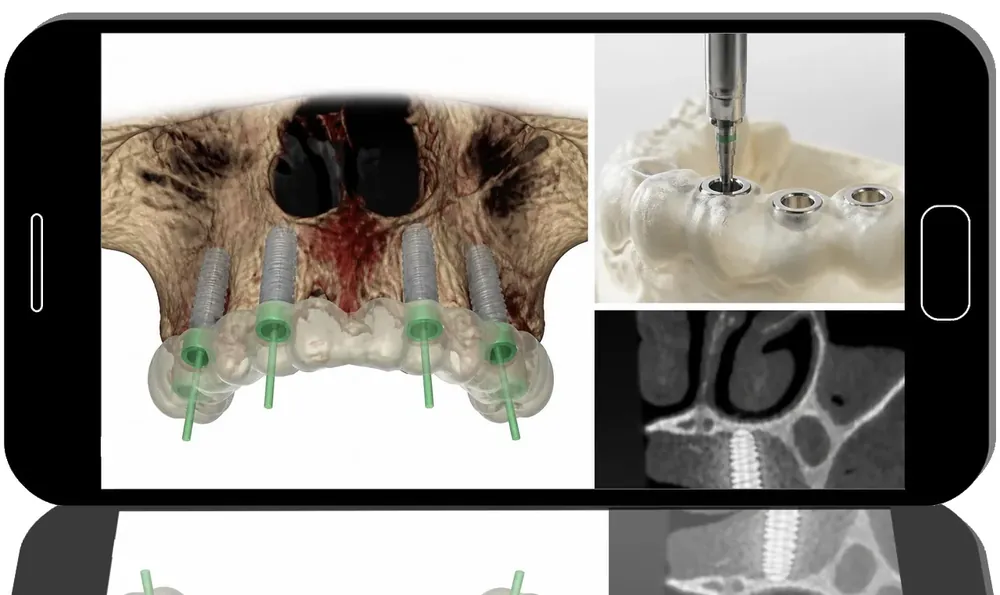
Giampiero Ciabattoni, author of the Quintessence title “Digital Implantology”, films nine real patients in Navigation Implantology Expert Guide, about 7.5 hours of step-by-step video. Each case runs from scan and virtual planning to guide design, surgery through the template and delivery of provisional or definitive teeth — partial edentulism, fully edentulous arches and severely resorbed maxillae included.
- 9clinical cases
- 7 h 30 minof video
- 30+ yearsinstructor experience
What you’ll be able to do
- Merge intraoral STL scans with CBCT and plan implant size, number and 3D position in software
- Design, test and stabilise a surgical guide with teeth or fixation pins
- Follow a guided drilling and insertion sequence with attention to speed and torque
- Run an All-on-4 in the mandible and full-arch cases in both jaws with same-day provisionals
- Handle an atrophic maxilla with a two-template approach and ridge reshaping
- Convert a removable overdenture into a fixed implant restoration
Inside the course
From data to template
Every lesson opens in the planning software: reading bone on CBCT, aligning scan files, virtually extracting teeth and building a guide before anyone touches the patient. Provisionals are often made ahead of surgery.
Surgery through the guide
The chairside sections show seating and pinning the template, soft tissue preparation, atraumatic extractions, the drill sequence and implant placement, then multi-unit abutments and fixation of the interim bridge.
Checking the outcome
Several cases return for occlusal adjustment, a two-month rescan or delivery of the final prosthesis, so you see whether the plan held up.
About Giampiero Ciabattoni
An oral surgeon in Faenza, Italy, he teaches on master’s programmes in computer-assisted implantology at the universities of Genoa and Padua, trained at the Brånemark Clinic, and is a former president-elect of the CAI Academy.
Built for
- Implant surgeons moving to guided protocolsNine complete workflows show where accuracy is won or lost.
- Prosthodontists planning full archesThe restorative end of immediate loading is filmed in detail.
- Clinics investing in scanners and CBCTA clear picture of how the digital pieces fit into daily surgery.
Curriculum
Lesson 1: Mandibular All-on-4 treatment workflow (35 min) 13 steps
- Virtual planning of the entire case in dedicated software
- Designing and testing the surgical guide in a digital environment
- Selecting the exact implant dimensions and three-dimensional positioning
- Gentle extraction of the lower incisors with minimal trauma
- Tooth preparation to create stable support for surgical guide fixation
- Placement and secure stabilization of the guide with pins
- All-on-4 protocol in the mandible
- Soft tissue management and mucosal preparation
- Step-by-step drilling sequence
- Implant insertion with focus on rotational speed, torque control, and key technical subtleties
- Subsequent removal of the prepared abutment teeth
- Connection of multi-unit abutments
- Try-in and definitive fixation of the provisional prosthesis
Lesson 2: Coordinating Treatment Across Both Upper and Lower Dental Arches (45 min) 13 steps
- Acquisition of intraoral scans and construction of a full digital patient model
- Digital planning and 3D positioning of implants
- Design and simulation of the surgical guide in the software
- Virtual removal of teeth to reproduce the post-extraction anatomy
- Fabrication of provisional restorations in advance of the surgery
- Soft tissue management and preparation
- Gentle, minimally traumatic tooth removal
- Adaptation and stabilization of the surgical guide in the mouth
- Sequential drilling procedures
- Insertion of implants according to the digital plan
- Placement and securing of temporary prosthetic restorations
- Evaluation of occlusion and functional articulation
- Two-month follow-up assessment with repeat intraoral scanning to control treatment outcomes
Lesson 3: Treatment approaches for advanced bone loss in the maxilla (1 h) 12 steps
- Interpretation of bone defects using CBCT imaging
- Digital planning and design of the surgical guide
- Strategic implant planning: selecting optimal positions, determining number of implants, and choosing appropriate dimensions
- Fabrication of provisional prosthetic restorations
- Application of the initial surgical guide
- Site preparation for implants in the posterior regions
- Guided contouring of soft tissues and reshaping of the anterior alveolar ridge
- Placement and stabilization of the second surgical guide
- Drilling sequence and insertion of implants
- Connection of multi-unit abutments
- Securing the temporary prosthesis
- Postoperative assessment and analysis of treatment outcomes
Lesson 4: Managing complete tooth loss in the mandible: step-by-step rehabilitation (45 min) 10 steps
- Interpretation of CBCT scans and generation of a virtual dental model
- Planning implant diameter, length, and three-dimensional positioning
- Virtual design and testing of the surgical guide
- Fabrication workflow for analog models and provisional restorations
- Securing the surgical guide in the patient’s mouth
- Guided drilling sequence
- Insertion of the dental implants
- Connection of abutments
- Final fixation of the prosthetic restoration
- Assessment of occlusion and analysis of the functional and aesthetic outcome
Lesson 5: Restoring function and aesthetics in patients with complete tooth loss in both jaws (50 min) 9 steps
- Acquisition of intraoral scans and generation of virtual dental models
- Digital planning of implant placement
- Design and fabrication of surgical templates
- Positioning and stabilization of surgical guides
- Sequential drilling procedure
- Insertion of dental implants
- Attachment of interim prosthetic restorations
- Assessment and verification of clinical outcomes
- Fabrication and delivery of the final definitive prosthesis
Lesson 6: A showcase full-arch case revealing what digital treatment planning can really achieve (48 min) 8 steps
- Digital planning of an immediate prosthesis using the articulator
- Alignment and integration of STL files
- Positioning and securing of surgical guides
- Complete drilling sequence
- Insertion and positioning of implants
- Attachment of the provisional denture
- Postoperative review of clinical outcomes
- Clinical adjustment, fitting, and evaluation of the prosthesis condition
Lesson 7: Fully digital workflow for a maxillary implant overdenture case and its conversion from removable to fixed prosthetic rehabilitation (1 h) 9 steps
- Using CBCT data to plan implant treatment
- Determining ideal three-dimensional implant positioning
- Designing and optimizing surgical templates
- Placement and stabilization of surgical guides
- Sequential drilling protocol
- Insertion of dental implants
- Securing interim full dentures
- Converting an existing removable denture into a fixed restoration
- Final occlusal refinement and adjustment
Lesson 8: Managing a maxillary partial edentulism case featuring an existing central incisor implant (1 h) 9 steps
- Integrating STL data from intraoral scans with CBCT imaging
- Defining ideal 3D implant positioning
- Designing the surgical guide
- Planning extractions prior to implant placement
- Checking the accuracy of the guide on a stone model
- Positioning of surgical guides
- Sequential drilling steps
- Insertion of implants
- Securing provisional full-arch dentures
Lesson 9: Managing a maxillary extraction site in a patient with partial tooth loss (38 min) 7 steps
- Using CBCT data to plan implant treatment
- Choosing optimal implant positioning
- Creating and customizing surgical templates
- Positioning and securing surgical guides
- Sequential drilling steps
- Inserting and seating dental implants
- Planning, fabricating, and adjusting the provisional denture
Before you buy
Is there much theory, or mainly surgery footage?
It is built around filmed cases; the planning and surgical steps are demonstrated rather than taught as lectures.
Which planning software does the lecturer use?
The software brand is not specified, so expect to translate the steps to your own system.
Do I get CME credit or a certificate?
No. Clinicapedia provides the educational content only — no CME or CE credits, MOC points or certificates of completion are included with this product.
Specifications
| Format | Online video course |
|---|---|
| Instructor | Giampiero Ciabattoni |
| Contents | 9 lessons, one clinical case each |
| Duration | 7 h 30 min |
| Access | Lifetime, self-paced |
| Department | Dentistry |
| Delivery | Instant download · lifetime re-download |
Related products



Addiction Medicine

Dentistry